
Service Catalog Resources for Service Owners
Information and resources for ITS’ indexing of Service Offerings.
NAU’s Service Catalog is being rebuilt in 2025
We’re currently working to build out a redesigned and optimized service catalog, one that better represents the service offerings and products that ITS and NAU offer, as well as linking together request forms, Knowledge Base articles, and other relevant resources in one place.
These changes will also assist in connecting the necessary indexing in the backend of ServiceNow for internal use and reference.
What we’ll need from you
We’ll be building, designing, and publishing your service offering for you. To do this, we’ll need the relevant information about your service from you, who knows the service offering better than anyone.
We’ll be gathering the information from you and/or your team in a variety of ways. We may schedule meetings to run through a questionnaire to gather the basics, and we may also have you fill out a Qualtrics survey with questions about your service offering. We’ll be doing most of the heavy lifting, all you need to do is show up and answer questions about your service offering.
How a published service offering will appear to the public
Below is how a user will view your service offering once live. You can visualize how information and resources will be linked together in one place, so a user won’t need to search and dig around to find what they’re looking for.
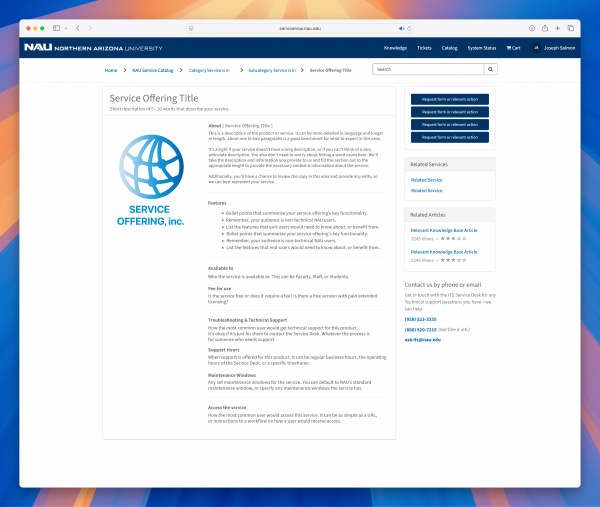
Download this wireframe as a PDF ›
How a service offering will appear as a thumbnail in the catalog
You can visualize how the service offering name, short description, and logo or icon populate globally in the service catalog.

Download this wireframe as a PDF ›
Questions you may have
As always, if you have a question related to the service catalog or ITSM, you can always reach out to us for more information. Questions and concerns can be sent to Celisa.Manly@nau.edu.
Having an intuitive service catalog brings multiple benefits to our community, including:
- Transparency, letting our users see which services we offer, who provides them, and how to request them or find support.
- Clarity, reducing confusion for students, faculty, and staff—directing them exactly where to go.
- Improved efficiency for routing requests, cutting down on miscommunication, and answering repeated questions.
- Support of self-service, allowing users to more easily find answers on their own through consolodated resources and request forms, reducing support load.
- Better user experience, making for a more modern and user-friendly experience.
A service offering is an entry or description of one or more services that is designed to address the needs of a university group (students, faculty, staff, affiliates, etc.). A service offering may include goods, access to resources, and consultative (professional) services.
Items like tasks, projects, services that aren’t offered publicly as professional services, and non-approved products are NOT service offerings that we’ll be listing in the updated service catalog. For example;
Learning management – this is a broad service, which wouldn’t be listed itself as a service offering.
Canvas, BBLearn, OpenLMS, Moodle – products like these are the actual service offering, and is what will be listed in the service catalog.
Vendor inquiries – this is a task, not a product or service offering, and won’t be listed in the catalog.
Brave Browser – This is a commercially available product, but not one approved and licensed for use at NAU, so it won’t be listed in the catalog.
Since the information in the Service Catalog will be publicly visible and available, it needs to be accurate and comprehensive enough for end-users to find what they are looking for and make informed decisions. Additionally, the metadata in the Service Offering Record is shared with other ServiceNow modules and tables for internal use.
No. Tools and software that are used exclusively by specific ITS groups are not listed in the service catalog since end-users outside of the specific ITS group will not be requesting them.
- Name of Service Offering: This is the title or name that the vendor/provider applies to the Service Offering. For example, Zoom, Canvas, Microsoft Access, etc..
- Alias: If NAU brands the offering differently than the vendor, the NAU brand goes in parentheses – for example, PeopleSoft Financials (LOUIE).
- Service Description: This is the full description of the Service Offering, including its purpose, benefits, features, and options. Much of this detail can be copied from the vendor’s site, but needs to be written in a way that the end user easily understands (i.e., not technical) and highlights the value it brings to NAU specifically.
- Audience/Affiliations: These are the users or constituents to whom the service or service offering is available (like faculty, students, staff, alumni, public, etc.). While all Service Offerings published in the catalog are publicly visible, they may not be requestable depending on affiliation. Including audience/affiliation will go towards making this clear to the end-user.
- Maintenance Windows: If there are set periods that the Service Offering may be unavailable due to scheduled maintenance, that information would be noted in this section.
- Requirements/prerequisites: Are there any conditions (prerequisites or requirements) that need to be met prior to an end-user requesting the service offering? These include things like training, approval, compliance, etc.
- Fees: Outside of the original purchase price, are there additional and/or ongoing costs to the end user or department for this service offering? This might be expressed on a per-user basis, by department, by volume consumption (pages printed, bytes stored, minutes of talktime), or however charges are assessed to users.
- How to Request the Service: Link to a request form, a contact email, or other means.
- Support Contact: From an end-user perspective, who can they contact for Support of the Service Offering? For Service Offerings encompassing goods or access to resources, the initial contact will more than likely be the ITS Support Desk, but there might be requests for professional services where specific ITS resources or groups will be the primary support contact.
- Support availability: What is the availability (days/hours) during which end users can get support for this service?
- Status: What is the operational status of the Service Offering (i.e., “In Development”, “In Production”, “Evaluating” or “Retired”)?
- Service Owner: The role accountable for managing a specific service throughout its entire lifecycle and crosses functional areas. They are responsible for ensuring the service meets business needs, delivers value, and is aligned with the overall IT strategy. The Service Owner information comes from the Business Service table and will not be publicly visible in the Service Catalog.
- Service Offering Manager: The person (not the organization/department) who is responsible for leading the technical operation and maintenance of the underpinnings of the service. This crosses functional areas and the information will not be publicly visible in the Service Catalog.
- Support Group: The group that responds if there is an outage or degradation.
- Related Services: Links to other services or service offerings in the service catalog that customers might be interested in, based on their interest in this one offering. For example, a customer interested in “Emails” may also be interested in “Email Lists”.
- Training Opportunities: If applicable, provide links to training manuals, upcoming classes, recordings, or other instructional materials to learn how to use the service.
- Documentation: If applicable, provide links to technical documentation about the service, how-to’s, and FAQs not already covered by KB articles.
- Knowledgebase Articles: Links to knowledge base articles, specifically about the service or service offering. Only links to public knowledge base articles will be made public.