
OnBase Retirement Project
ITS is working alongside campus partners to migrate university business processes, automations, and document management out of OnBase and into ServiceNow. For more information on this change, read our full news release.
How this migration works
Phase 1
Process migrations

To migrate the business processes, workflows, forms, and document management out of OnBase, we’re reconstructing these items and their full functionality in ServiceNow.
Meet with process owners
Members from the project team and ITS’ development teams will meet with process owners across campus to gather information about content housed in OnBase, and what each area requires for their technical and administrative needs.
Develop content in ServiceNow
Developers will begin to build out new processes, workflows, and forms in ServiceNow with attention to the needs of each process owner.
Approve and publish content
Once completed, the content will be tested and validated for approval or iteration by process owners. Once approved, it will be published live in ServiceNow.
Phase 2
Document management system
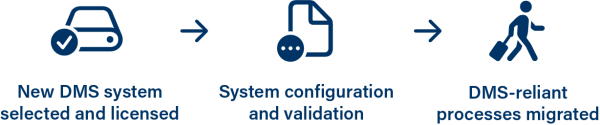
New DMS system selected and licensed
In order to accommodate technical features required by many of our university business processes, we’ll be licensing a new document management system, or DMS. A document management system allows for autonomous and bulk document editing, storage, and access permissions at scale.
System configuration and validation
Once licensed, we’ll begin the process of configuring the new system to integrate into NAU’s environment. This means ensuring the proper technical and security capabilities are configured before we begin rolling the new system into production.
DMS-reliant processes migrated
Once the new DMS is configured, we’ll then be able to complete migrations of business processes that require features provided by a document management sytem. This will allow us to complete the entirety of migrations out of OnBase and formally retire the legacy system.
Resources
Migration status
Last updated: October 1, 2026 at 4:47 PM MST
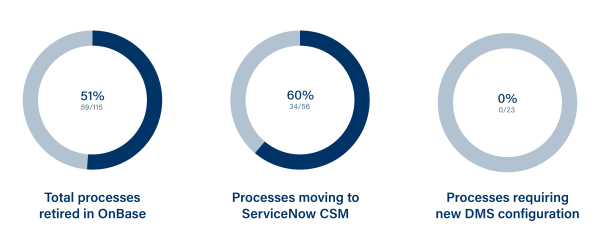
Total processes retired in OnBase
The number of processes successfully retired from the OnBase platform, meaning that form submissions and automations are no longer accepted or processed. This number encompasses any migration mediums, including processes that have moved to ServiceNow, an alternative platform, or have been retired from university use altogether if no longer needed.
Processes moving to ServiceNow CSM
The number of processes that have been evaluated as candidates to move into ServiceNow’s CSM module. Development and migrations on these processes are ongoing and span several unique cases and requirements.
Processes requiring new DMS configuration
These workflows are contingent upon the licensing and configuration of a new document management system, and are unable to be migrated until then.
Frequently asked questions
Have a question not listed below? Reach out to OnBaseRetirement@nau.edu, and one of our team members will respond to your message.
Currently, we’re aiming to finish migrating business processes, workflows, and forms out of OnBase by spring of 2027. Many processes are already completely migrated and live in production in ServiceNow. You can view the status of migrations on this webpage’s migration progress bar. If you’re curious about the status of a form, workflow, or process, contact us.
A document management system, or DMS, is a system that stores, tracks, modifies, and automates files and data. These systems are designed to handle large amounts of data (such as university transcripts or records) and provide automation, access protections, and compliance features that help ensure university data is secure and readily available for institutional use.
While migrating processes and workflows into ServiceNow, we’ve enabled a new feature set known as CSM, or Customer Service Management. We’ve enabled this suite to bring improved functionality and modern tools for the new processes and content being migrated into ServiceNow. CSM brings us new functionality for how workflows and processes are interacted with and automated by teams and our community.
Our training teams are currently working to create NAU-specific training videos, guides, and documentation. You can find our current resources on our OnBase Migration Training Resources Webpage. We’ll be updating this site with new trainings as they’re created.
Training and Documentation
You can view our in-house training materials on our dedicated OnBase Migration Training Resources webpage. This page will be continuously updated with new materials as they are published.
Support and updates
For questions and concerns related to this project, you can get in touch with the project team by emailing OnBaseRetirement@nau.edu, and we’ll respond to your query. Additionally, this webpage will be regularly updated with information and resources related to this project.