News & Updates • October 7, 2025
Updates to how our NAU community interacts
with our Service Portal

We’re building out a new, simpler catalog of our services, making offerings and requests more accessible than ever.
We’re currently working to improve the user experience of our public ServiceNow catalogs so that our service offerings, request forms, and support options are more accessible for our community. Previously, finding and requesting services in our public catalogs could be complex or unintuitive for many NAU users. With this effort, we’re looking to solve two problems: make our Service Catalog more clear and concise, as well as consolidate our Request Catalog and Service Catalog into a single service hub.
Our goal with building out a new Service Catalog
Our legacy Service Catalog doesn’t provide much information about a service offering, nor does it display relevant forms, Knowledge Base articles, or links. For example, if an NAU user goes to our current Service Catalog looking for information about a LOUIE portal, they’ll see a catalog item for LOUIE, but no information or resources for that item outside of the fact that it exists in our portfolio.
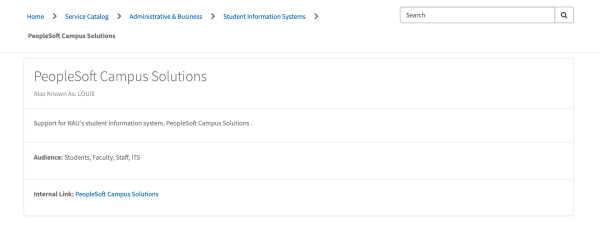 Our legacy catalog doesn’t provide much information about the service offering or any actionable items, like request forms.
Our goal with redesigning our Service Catalog is to create more dynamic items that provide users with clear information about a service offering, as well as all relevant request forms, login portals, Knowledge Base articles, and other data in one single place.
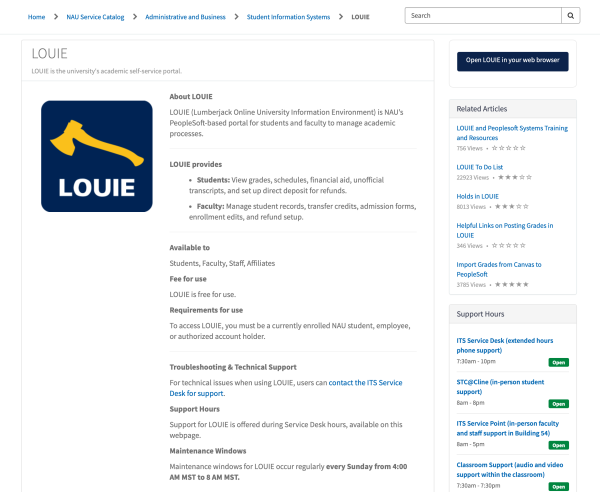
Our new catalog template brings in all aspects of information and resources for a service offering.
Request forms and the eventual merger of our Request Catalog with our Service Catalog
Right now, we’re operating in a ‘split-catalog’ state, where ITS manages the legacy Service Catalog, as well as our Request Catalog. Our current Request Catalog is the hub of all ‘actionable’ items, specifically for request forms and incident tickets.
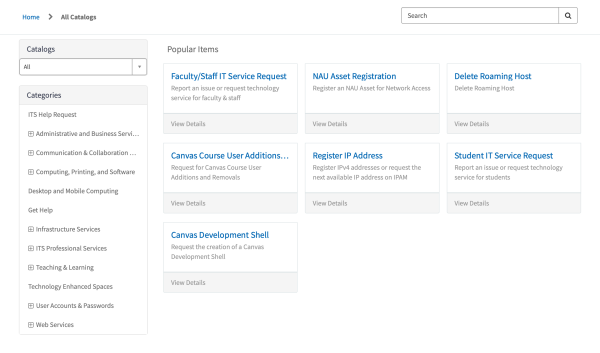
Our current Request Catalog houses workflows for request forms or incident creation.
Looking ahead, once all of our 100+ service offerings are populated into the new Service Catalog, we’ll be migrating and optimizing all of our current request forms in the Request Catalog into the new Service Catalog, linking request forms to their relevant service.
The effort to migrate and merge request forms into the Service Catalog is not occurring at the time of the initial launch of the New Service Catalog. At the time of this news release, the ITS Request Catalog and ITS Incident Catalog will remain unchanged.
After this eventual consolidation of both catalogs, instead of looking through a catalog of request forms for the right one, you’ll go straight to the service’s catalog item and find all relevant request forms linked directly to that offering.
For instance, the request form for ‘Canvas Development Shell’ would be housed directly on the Service Offering page for Canvas, so that if a user is looking for a request form relevant to a service offering, they’ll find it linked to the service offering itself.
Where we stand today
With this news release, we’re excited to announce the go-live of our new Service Catalog into production. This means that our legacy Service Catalog will be retired and replaced with the continually expanding new Service Catalog.
We worked alongside the ITS Service Desk to narrow down and determine which services were the most highly requested or visible to our community¹, and began our efforts with the top 20. With this go-live, the new Service Catalog will be available with these service offerings² and will continue to grow steadily as we work our way through our portfolio of services.

- Administrative and Business
- Business Capability and Process Automation
- Onbase
- Financial and Procurement Systems
- LOUIE Financials
- Human Resource Systems
- LOUIE HR
- Student Information Systems
- LOUIE
- Business Capability and Process Automation
- Communication and Collaboration
- Email
- Gmail
- Microsoft Exchange
- File Sharing & Storage
- NAU Shares
- Productivity and Collaboration Tools
- Microsoft 365
- Email
- Desktop and Mobile Computing
- Cloud Computing and Virtual Applications
- NAU Virtual Applications (apps.nau.edu)
- VDesk
- Printing and Related Services
- JacksPrint
- Cloud Computing and Virtual Applications
- Information Security
- Identity and Access Management
- Duo Two-Step Verification
- Identity Credentials & Badging
- Digital JacksCard
- Identity and Access Management
- Infrastructure
- Virtual Private Networking (VPN)
- NAU Virtual Private Network (VPN)
- Wireless Networking (Wi-Fi)
- NAU Wireless Network
- NAU Guest Wireless Network
- Virtual Private Networking (VPN)
- Research
- Research Software
- SPSS
- Research Software
- Teaching and Learning
- Learning Management
- Canvas
- Learning Management
- IT Professional Services
- IT Service Delivery and Support
- ITS Service Desk
- STC@Cline Service Point
- Classroom Support
- Desktop Support
- IT Service Delivery and Support
Next steps & transparency in the process
From here, we’ll continue our work in populating our new Service Catalog with service offerings from our portfolio, with each sprint being broken into separate waves. This go-live marks the completion of wave one, with wave two slated to begin in early October.
During each wave of creating entries in the catalog, we focus on three main stages: Gathering data, creating the entries, and publishing with approval from the service owner.

We’ll schedule time with the service owner and any stakeholders tied to a service offering to ask questions about the service and learn about what details we should make known to our community. We may also ask service owners to fill out a Qualtrics survey about the service offering.
Then, we’ll create the outline for the entries using Microsoft Copilot to generate a basic template of the content for manual copyediting and tailoring to properly fit our context. Alongside this, we’ll match Knowledge Base articles, related services, and relevant action items as buttons.
Finally, we’ll present the completed draft to the service owner for approval or edits, and then publish to the Service Catalog once approved.
For service owners
If you’re a service owner, we’ve prepared some basic guidelines and expectations for you in this process. You can learn more about our catalog template, see how an item is populated in the catalog, as well as FAQs about services, service offerings/products, and more.
Pre-approved software
Also encompassed by this work, we’re looking to better publicly document our offerings of pre-approved software in the Service Catalog. Software that has already been approved for NAU use will be entered into the catalog with a software-specific wireframe. We’re beginning our work to enter approved software into the catalog during the upcoming wave 2, and we’ll have more information about software offerings in the months to come.
¹= While our service offerings in wave one were informed by the top 20 most visible and requested service offerings, the actual reflected offerings vary slightly due to several factors, including workload, pending approvals, and security constraints. The services in the catalog today are not a direct reflection of the top 20 in exact chronological order.
²= The final count of services in this first wave is 22.