Information Technology Services
Virtual Visit Request info Apply
MENUMENU
  • Services
    • Services for...
      • Students
      • IT Services for Faculty
      • IT Services for Staff
      • Sponsored Affiliates at NAU
    • Hardware & Software
      • Computer & Endpoint Device Purchasing
      • Printing
      • Web Browsers
      • Software at NAU
    • Communication & Collaboration
      • Email & Calendars
      • NAUgo Mobile App
      • Phones, Mobile, & Voicemail
      • Video Conferencing & Messaging
    • Professional Services
      • Enterprise Business Analysts
      • Development
      • Project Management
      • Training & Documentation
      • User Experience & Design
      • Web & Mobile Development
      • Solution Recommendation & Design
    • General Services
      • Our Services
      • Service Catalog
      • Service Management
    • Infrastructure & Networking
      • File Sharing & Storage
      • Remote Services
      • Servers & Hosting
      • Wi-Fi & Networking
    • Academic & Research Technology Services
      • Canvas
      • Artificial Intelligence
      • Classroom Support
      • Computer Labs
      • Survey & Statistical Services
      • High Performance Computing
      • Secure Computing
  • Security
    • Information Security at NAU
    • Phishing
    • Two-Step Verification
    • Antivirus
    • Data Security
  • Get Help
    • Search Knowledge Articles
    • Submit a Ticket
    • View My Tickets
    • Contact Information & Hours
  • About
    • About ITS
    • Contact Information & Hours
    • Directory
    • News
    • ITS Employee Forms
    • ITS Meeting Spaces
    • Organizational Structure
    • About our CIO
  • IN
  • ITS
  • Populate an Expense Report from a Travel Authorization

Contact ITS Support

928-523-3335 Students: ask-stc@nau.edu General ITS inquiries: ITS@nau.edu
Request ITS Support

Know the rules

All NAU employees and students should read and be familiar with the Appropriate Use of IT Resources policy. Information Technology Policy Manual

Related Links

  • Comptroller PeopleSoft Financial Training and Documentation page

Wi-Fi Map in Arizona

Interactive Map for access to free Wi-Fi hotspots throughout the state.

Populate an Expense Report from a Travel Authorization


Copy From a Travel Authorization Accordion Closed

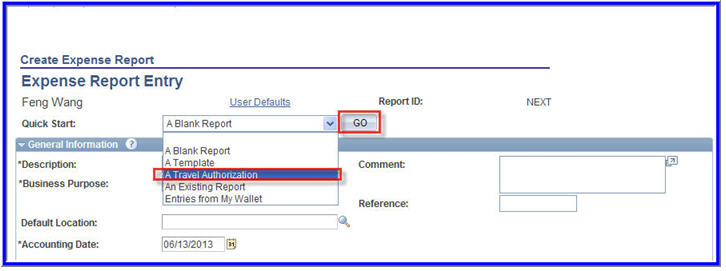
Travel Expense Center>Expense Report>Create
01-TE-CopyFrTrvlAuth

Quick Start: Select from the drop down menu a Travel Authorization

Go

Populate From a Travel Authorization Accordion Closed
02-TE-DateRange

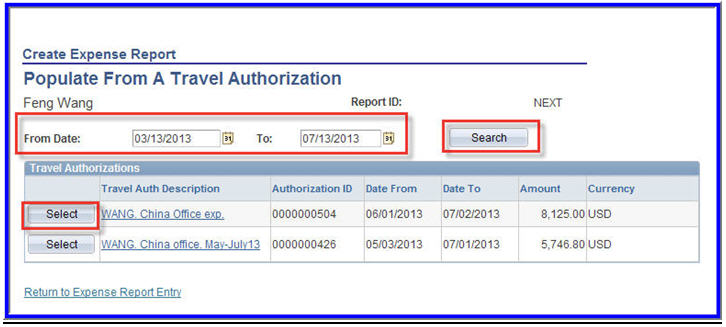
Date Range:  Select a date range to display approved travel authorizations from a specified period.  (Optional).

Search:  Select the search button.

Select:  Click Select to select the travel authorization to use as a basis for the expense report.

Expense Report Entry Accordion Closed

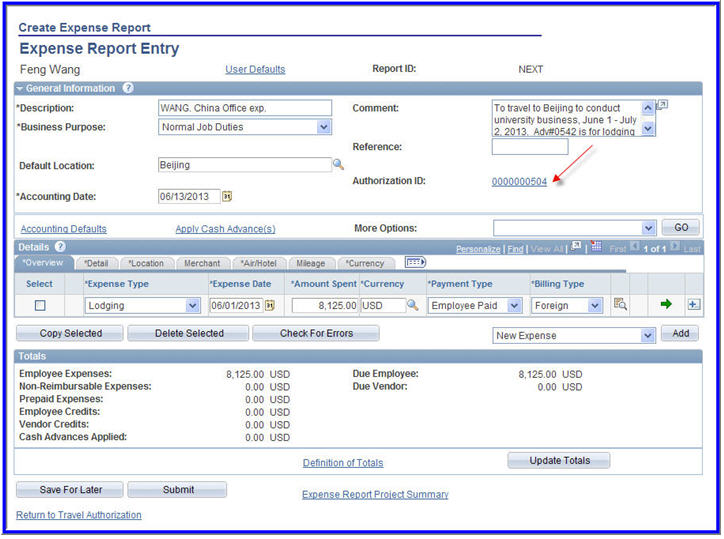
PeopleSoft Expenses displays the Expense Report Entry page and populates the fields with data from the travel authorization that you copied from.  Update the expense report based on the actual out of pocket expenses.
03-TE-ExpRptEntry

Apply Cash Advance Accordion Closed

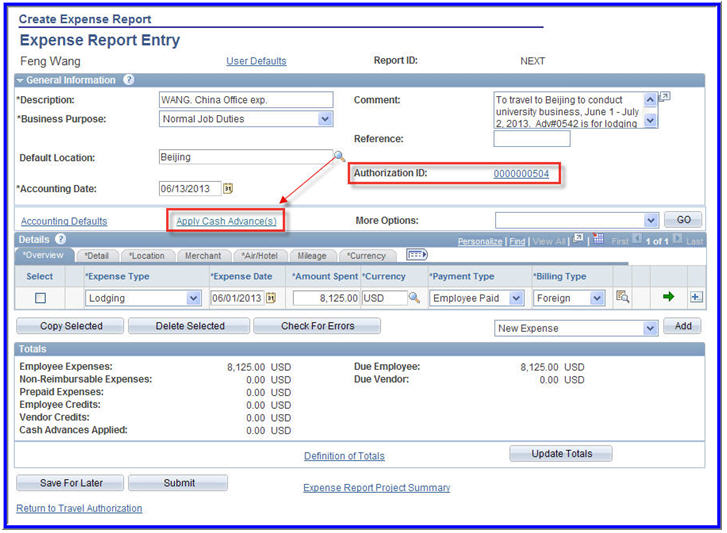
You can apply a cash advance to more than one expense report, and you can apply more than one cash advance to an expense report. When a cash advance is applied, PeopleSoft Expenses updates the cash advance balance accordingly. If the expense report is denied, the balance of the cash advance is restored and available for use on another expense report.
04-TE-ApplyCashAdvance


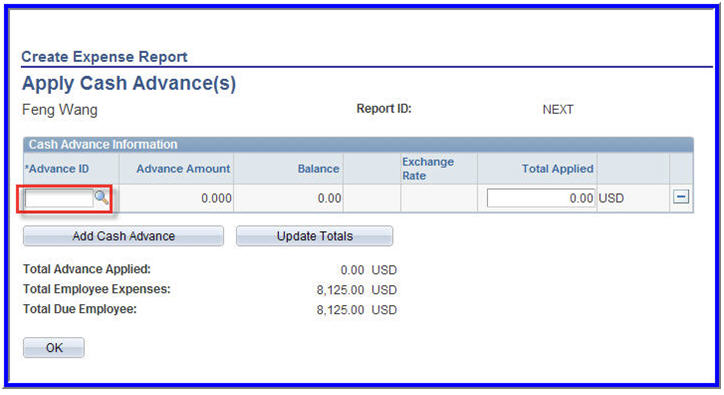
Apply Cash Advance(s):  Select the Apply Cash Advance(s) hyper link

Apply Cash Advance Lookup Accordion Closed
05-TE-Cash Advance LookUp

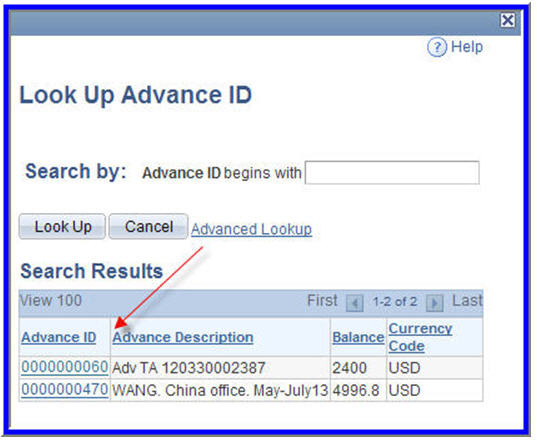
Advance ID:  Select the magnifying glass.  A Lookup page will display
06-TE-LookUp Advanced ID

Advance ID:  Select the cash advance ID that you want to apply to the expense report. You can apply more than one cash advance to an expense report.
07-TE-Total Applied

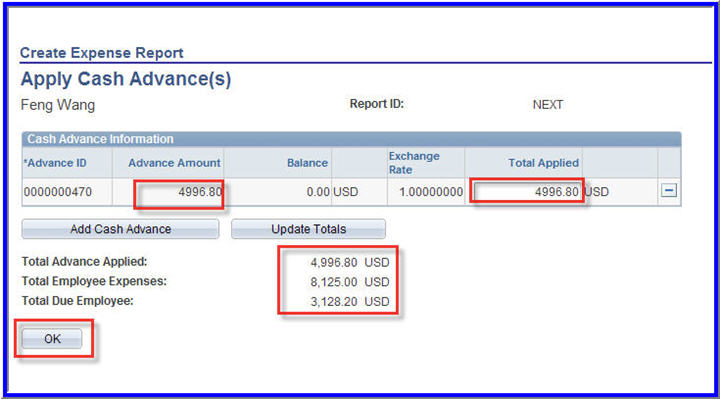
Total Applied:  The amount of the cash advance that is applied to expense report.

Add Cash Advance:  Click to add another line to select an additional cash advance to apply to the expense report.

Update Totals:  If you change the cash advance applied amount, then click to update the Total Advance Applied and Total Due Employee fields.

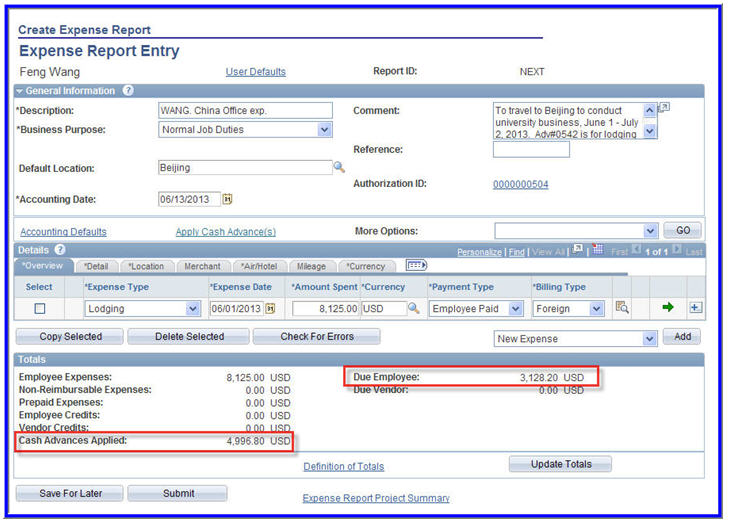
Total Due Employee:  Indicates the amount due to either the employee or the company after applying the total cash advance amounts.

 OK
08-TE-Due Employee


Information Technology Services
Location
Building 54
Information Technology Services
1301 S. Knoles Drive
Flagstaff, AZ 86011
Mailing Address
PO Box 5100
Flagstaff, AZ 86011
Email
ask-its@nau.edu
Phone
928-523-3335
888-520-7215
Social Media
Visit us on X Facebook Instagram Youtube