Information Technology Services
Virtual Visit Request info Apply
MENUMENU
  • Services
    • Services for...
      • Students
      • IT Services for Faculty
      • IT Services for Staff
      • Sponsored Affiliates at NAU
    • Hardware & Software
      • Computer & Endpoint Device Purchasing
      • Printing
      • Web Browsers
      • Software at NAU
    • Communication & Collaboration
      • Email & Calendars
      • NAUgo Mobile App
      • Phones, Mobile, & Voicemail
      • Video Conferencing & Messaging
    • Professional Services
      • Enterprise Business Analysts
      • Development
      • Project Management
      • Training & Documentation
      • User Experience & Design
      • Web & Mobile Development
      • Solution Recommendation & Design
    • General Services
      • Our Services
      • Service Catalog
      • Service Management
    • Infrastructure & Networking
      • File Sharing & Storage
      • Remote Services
      • Servers & Hosting
      • Wi-Fi & Networking
    • Academic & Research Technology Services
      • Canvas
      • Artificial Intelligence
      • Classroom Support
      • Computer Labs
      • Survey & Statistical Services
      • High Performance Computing
      • Secure Computing
  • Security
    • Information Security at NAU
    • Phishing
    • Two-Step Verification
    • Antivirus
    • Data Security
  • Get Help
    • Search Knowledge Articles
    • Submit a Ticket
    • View My Tickets
    • Contact Information & Hours
  • About
    • About ITS
    • Contact Information & Hours
    • Directory
    • News
    • ITS Employee Forms
    • ITS Meeting Spaces
    • Organizational Structure
    • About our CIO
  • IN
  • ITS
  • Microsoft Teams New Look

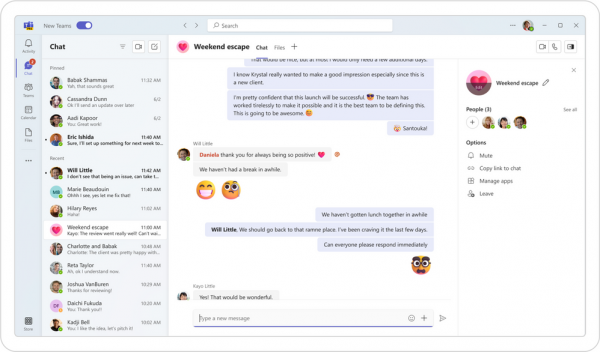
New Microsoft Teams – An upgraded look and feel for Teams

✦ News & Updates

✦ Microsoft Teams

✦ Tools & Tech @ NAU

Microsoft has rolled out New Teams – a new update to Team’s interface and user experience for users. NAU users will begin seeing the new update in March 2024, with some users already opting in.


What is New Teams?

The new update to Microsoft Teams brings in an improved user interface, as well as performance boosts to speed up the application, as well as consume less resources such as battery life and CPU usage.

Users can opt-in from their Teams application to try out New Teams, and NAU will be rolling out the update to all enterprise devices in March of 2024.

Improved Performance

Up to two times faster for app launch, joining meetings, and navigating the application.

Intuitive Interface

An upgraded interface that reduces clutter and is easier to navigate and use.

When to Expect New Teams

You may have noticed a tab at the top bar of your Teams application to try out New Teams, you can toggle this switch to experience the update and get familiar with the new interface and features. Many NAU users are already using New Teams and enjoying the new features and performance.

NAU will be deploying New Teams across the university during March of 2024, so if you haven’t yet toggled into the New Teams, you’ll see the update after March 26th.

Unsure if you’re using New Teams already?

If you’re opted into New Teams, you’ll see a ‘NEW’ banner across your Teams app icon.

Get familiar with Microsoft Teams

ITS has a comprehensive library of tutorials for using New Microsoft Teams for NAU work, made by NAU users for the Lumberjack community.

NAU Microsoft Teams Training


Looking for more information?

You can learn more about the update from Microsoft at Microsoft’s New Teams Webpage.


Information Technology Services
Location
Building 54
Information Technology Services
1301 S. Knoles Drive
Flagstaff, AZ 86011
Mailing Address
PO Box 5100
Flagstaff, AZ 86011
Email
ask-its@nau.edu
Phone
928-523-3335
888-520-7215
Social Media
Visit us on X Facebook Instagram Youtube