
Information Technology Services
Virtual Visit Request info Apply
MENUMENU
  • Services
    • Services for...
      • Students
      • IT Services for Faculty
      • IT Services for Staff
      • Sponsored Affiliates at NAU
    • Hardware & Software
      • Computer & Endpoint Device Purchasing
      • Printing
      • Web Browsers
      • Software at NAU
    • Communication & Collaboration
      • Email & Calendars
      • NAUgo Mobile App
      • Phones, Mobile, & Voicemail
      • Video Conferencing & Messaging
    • Professional Services
      • Enterprise Business Analysts
      • Development
      • Project Management
      • Training & Documentation
      • User Experience & Design
      • Web & Mobile Development
      • Solution Recommendation & Design
    • General Services
      • Our Services
      • Service Catalog
      • Service Management
    • Infrastructure & Networking
      • File Sharing & Storage
      • Remote Services
      • Servers & Hosting
      • Wi-Fi & Networking
    • Academic & Research Technology Services
      • Canvas
      • Artificial Intelligence
      • Classroom Support
      • Computer Labs
      • Survey & Statistical Services
      • High Performance Computing
      • Secure Computing
  • Security
    • Information Security at NAU
    • Phishing
    • Two-Step Verification
    • Antivirus
    • Data Security
  • Get Help
    • Search Knowledge Articles
    • Submit a Ticket
    • View My Tickets
    • Contact Information & Hours
  • About
    • About ITS
    • Contact Information & Hours
    • Directory
    • News
    • ITS Employee Forms
    • ITS Meeting Spaces
    • Organizational Structure
    • About our CIO
  • IN
  • ITS
  • Enterprise Voice – IP Phones

Wi-Fi Map in Arizona

Interactive Map for access to free Wi-Fi hotspots throughout the state.

Enterprise Voice – IP Phones

ITS supports a variety of different devices for use with Enterprise Voice. The Polycom CX 600 IP Phone has been classified as a supportable device for use around the university. The Polycom CX 600 supports connections to your Windows computer via a USB cable for a ‘better together’ experience. To learn more about using the Polycom IP Phone with Enterprise Voice select from any of the options below.

Index:

  • Polycom CX600 – Standalone
  • Polycom CX 600 – USB Connected to Windows*Please note that at this time Macintosh computers do not support connections via a USB cable.
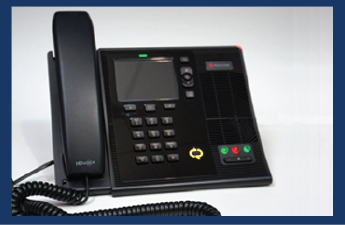
Polycom CX 600 - User Manual View the manufacturers user manual for the Polycom CX 600.
Polycom CX 600 - Video Tutorials Learn how to use the Polycom CX 600 through video tutorials.

Polycom CX 600 – Standalone

Setup & Configuration for Standalone Use Learn how to setup your Polycom CX 600 for standalone use.
Phone Call Learn how to place a phone call directly on the Polycom CX 600.
Transferring a Call Transfer an active phone call to another party.

Conference Calling Learn how to place a conference call to multiple participants.
Forwarding Options Learn how to forward your phone to another person or phone.
Voicemail Check or listen to voice messages from Enterprise Voice.

More Information Learn more about working with the Polycom CX 600 as a standalone device.

Polycom CX 600 – USB Connected to a Windows computer running Microsoft Skype for Business 2015

Setup & Configuration for USB Connection to Windows Learn how to setup your Polycom CX 600 for USB connection to a Windows Computer running Skype for Business 2015.
Phone Call Learn how to place a phone call using Microsoft Skype for Business 2015.
Transferring a Call Transfer an active phone call to another party.

Conference Calling Learn how to place a conference call to multiple participants.
Forwarding Options Learn how to forward your phone to another person or phone.
Out of Office Notifications Setup out of office notifications for your phone when you are going to be away for extended periods of time.

Voicemail Check or listen to voice messages from Enterprise Voice.
More Information Learn more about working with Skype for Business 2015 and Enterprise Voice.

  • Document

    Telephone Services

    NAU Telephone Services


    Learn about the telephone services offered at NAU


  • Document

    Voicemail Services

    Voicemail Services


    Discover how to work with the Voicemail system at NAU.


  • Document

    Exchange Email

    Exchange Email & Calendars


    Find out how to work with Email and Calendars at NAU


  • Document

    Information Security

    Information Security

Information Technology Services
Location
Building 54
Information Technology Services
1301 S. Knoles Drive
Flagstaff, AZ 86011
Mailing Address
PO Box 5100
Flagstaff, AZ 86011
Email
ask-its@nau.edu
Phone
928-523-3335
888-520-7215
Social Media
Visit us on X Facebook Instagram Youtube