News & Updates • February 17th, 2025
Updates to the authentication process for NAU’s VPN through Cisco Secure Client

Authentication with Cisco Secure Client will now include NAU’s official authentication process.
Beginning on February 17th, users will notice a change in the authentication process when connecting to the NAU VPN through the Cisco Secure Client application.
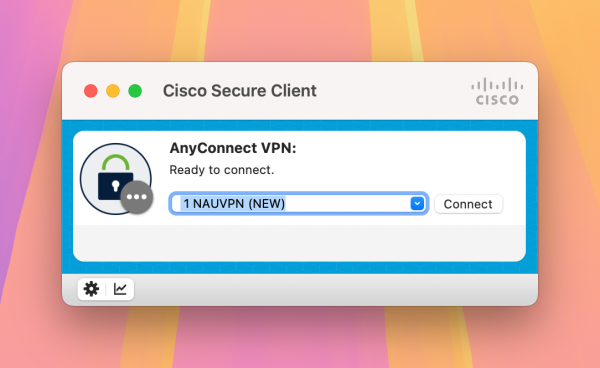
The Cisco Secure Client interface before connecting to the VPN1.
With this change, when a user clicks to connect to the VPN, a browser window will open with NAU’s standard CAS login screen, prompting the user to enter their NAU credentials. Once a user enters their NAU username and password, a Duo authorization page will appear with a three-digit code for users to enter into their approved Two-Step Verification mobile device.
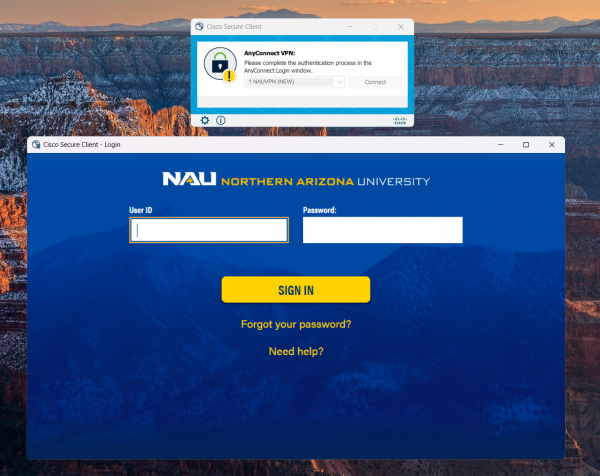
Cisco Secure Client and the prompted login screen.
After the user completes the login process by entering their credentials and approving the authorization prompt in Duo, the connection to the VPN will complete, and the browser window will close.
Why is this change happening? Accordion Closed
NAU is moving to a more secure method for authentication for the VPN service, and is retiring legacy methods that are no longer supported by our partners due to security and compatibility concerns.
What if I use a Two-Step Fob to authenticate? Accordion Closed
If you use a Two-Step FOB, you’ll authenticate in the same way you do for existing NAU web services that require Duo authentication. When prompted to authenticate into Duo, select “Hardware Token” (if necessary), enter in the code found on your Two-Step FOB, and then select “Verify”.
My Cisco Secure application says it’s updating – is this normal? Accordion Closed
Yes, the Cisco Secure Client application will update itself automatically. The application may prompt you to restart the window in order for the change to go into effect.
Notice for users that use the Start Before Login (SBL) feature Accordion Closed
The Start Before Login feature will no longer be supported after these changes go into effect. This means that users who have previously used this feature will need to manually connect to the VPN after login to access protected resources.
If you have any questions or concerns about this change, reach out to us over email.
- The appearance of the window may differ slightly based on a user’s operating system. The examples shown on this webpage are visuals from MacOS Sequoia (15). Label text will not differ based on OS.