Academic unit site support
Business unit site support
Don't see these options? Not familiar with Enterprise Plus? Please visit the Enterprise Plus homepage.
Related Links
Overview Accordion Open
The related links shortcodes were introduced to add quick navigation to specific page(s). These lists have the option to be automatically updated, to easy maintenance over time.
Example Accordion Closed
Enterprise Plus Shortcodes (Siblings)
How To Accordion Closed
Before we create the shortcode, it’s important to know that Siblings and Children relationships are decided on the structure of your pages.
NAU Domain
Individual website
Page
Child page
URL 1. https://nau.edu/admission/western-undergraduate-exchange/california/
URL 2. https://nau.edu/admission/western-undergraduate-exchange/
URL 3. https://nau.edu/admission/western-undergraduate-exchange/colorado/
URL 4. https://nau.edu/admission/freshman-admission/
If we add a Sibling shortcode to URL 1, it will display a list of pages of all the orange pages, like /Colorado/. If we add a Children shortcode, we will get an empty list, because /California/ doesn’t have any child pages.
If we add a Sibling shortcode to URL 2, it will display a list of all pages on the site, including URL 4. Child pages will not be included in this list, due its relationship to top level pages. If we add a Children shortcode, we will get a list of all the orange pages.
To add a set of related links to your page, you can start by selecting “Display siblings”, “Display children”, “Create my own list”.
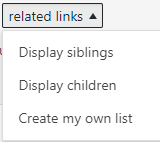
The a shortcode will appear in the editor
[ eplus-related-links linkoption=”siblings”] [ /eplus-related-links] | Will automatically create a list of siblings[ eplus-related-links linkoption=”children”] [ /eplus-related-links] | Will automatically create a list of child pages
[ eplus-related-links linkoption=”own”]
- Link 1
- Link 2
- Link 3
The following code snippet
[ eplus-related-links linkoption=”own”] [ /eplus-related-links]Will create:
Troubleshooting Accordion Closed
Why is nothing showing up? There is a chance the page you are creating the children or sibling shortcode on doesn’t have either of those two options. Please see the first section of the “How To” for more details.
For any additional questions or concerns, submit a support request, or give us a call 928-523-9267.