Academic unit site support
Business unit site support
Don't see these options? Not familiar with Enterprise Plus? Please visit the Enterprise Plus homepage.
Spacer
Overview Accordion Open
The spacer shortcode was added in order to add extra space between content, without using any unnecessary code. The spacer increments provided have been predetermined and cannot be adjusted.
Example Accordion Closed
There will be 15px of space between this text and the next text.
There will be 30px of space between this text and the next text.
There will be 60px of space between this text and the next text.
There will be 90px of space between this text and the next text.
This is the last bit of text.
How To Accordion Closed
In order to add space between your content, put your cursor where you would like the space to appear.
Then from the toolbar selected the desired amount of space you would like to appear from the dropdown.
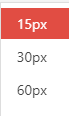
You will see the following shortcode:
[ spacer height=”#“]The # will be replaced with the chosen amount of space.
The following code snippet
Some text with space below
[ spacer height=”90″]Some text with space above
Will create:
Some text with space below
Some text with space above
Troubleshooting Accordion Closed
For any additional questions or concerns, submit a support request.