Academic unit site support
Business unit site support
Don't see these options? Not familiar with Enterprise Plus? Please visit the Enterprise Plus homepage.
Story Module
Overview Accordion Open
The Story Module was added to dramatically highlight content on a page. This shortcode is not intended to be used on every page, or multiple times on a single page.
Example Accordion Closed

Headline
Subhead goes here
Placeholder content
Headline
Subhead goes here
Placeholder content
How To Accordion Closed
In order to add a Story Module shortcode, please select an option from the dropdown.
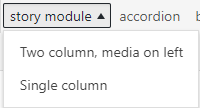
Two column media on left – This will create the first example in the previous tab, this is good if you have accompanying media you’d like to highlight too.
Single Column – This will create the second example in the previous tab. If you have no media to go with your content the information ill be center aligned.
Once you select your preferred option a shortcode along with placeholder text will appear. If you select Two column media on left, it will prompt you to choose an image first from the media library.
The following code snippet
[ eplus-add-story-module layout=”two-col” image-align=”left” image-post-id=”932″]Headline
Subhead goes here
Placeholder content
[ /eplus-add-story-module]Will create:
Headline
Subhead goes here
Placeholder content
Troubleshooting Accordion Closed
Text I added doesn’t appear correctly, why? Sometimes if an entire placeholder line is deleted it will remove the special tag it. The simplest way to fix this is by recreating the shortcode, but and replacing your text without deleting the whole line.
For any additional questions or concerns, submit a support request, or give us a call 928-523-9267.