Contact CaPCOT Financials
Financials
FAQs
Submit a Purchase Request ticket through the Employee Service Center portal or contact the Antelope Service Delivery Team.
If a payment request will exceed $2,500 and will be charged to your department speedchart (not charged to a project or work order), then VP approval is required.
- A Purchase Request ticket should be created through the Employee Service Center portal before any services are rendered or materials/supplies have been received and the invoice can be uploaded to the ticket for payment by the Service Delivery Team.
- The invoice can be paid with a department PCard and reconciled before month-end.
A Worksite Hazard Inspection/Hazard Communication (FS-13) Request must be filled out prior to disturbance of any building material in any facility on the Northern Arizona University campus. The material safety office will issue an inspection summary and Hazard Communication Form to the requestor. If hazardous materials or conditions are present, the form will indicate them and make recommendations to ensure the health and safety of employees performing the work and the building occupants.
Hazard Inspections require advance notice. Please plan and schedule accordingly. For more information on inspection request turnaround times, please refer to the Hazard Inspection Timeframes guidelines page.
The vendor will need to fill out he Vendor Authorization Form and send to Purchasing Services. Once the vendor has been entered into PeopleSoft Financials a purchase order can be issued.
Contact NAU’s Insurance Department at NAU-Insurance@nau.edu to determine if the vendor you are using has current and proper insurance.
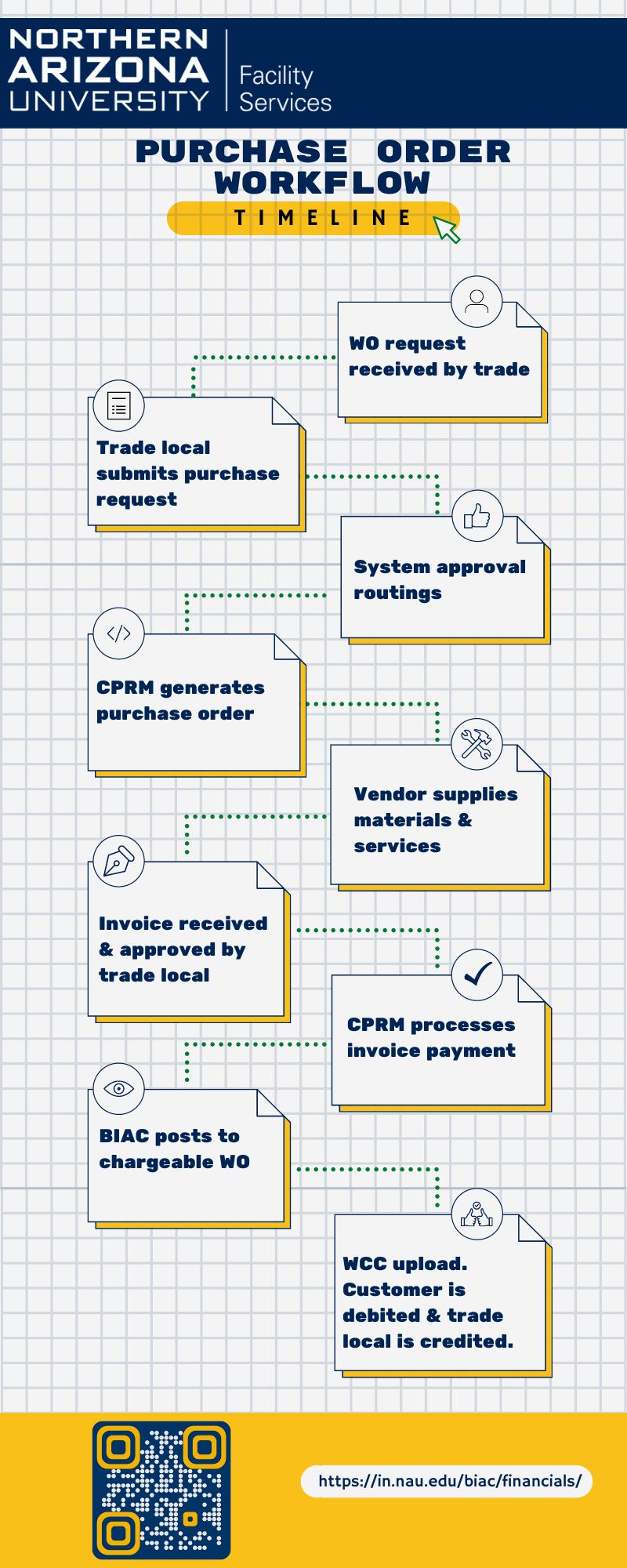
- See the Purchase Order Workflow timeline